
During an interview, it’s important that interviewers know which questions are being asked and who is asking them. Quinto’s scorecards ensure everyone can see the questions and contribute feedback in a standardized format. Use the steps below to familiarize yourself with the interface and the process of rating candidate responses.
Step 1. Open the scorecard
From the email invite
-
Open the email invite you received from Quinto.
-
Click View scorecard at the bottom of the email.
From your tasks
-
Log in to Quinto.
-
Click the list icon on the top right of the screen.
-
Find the interview and click Open.
From the Openings page
If you have the Manage interviews permission:
-
Click Interviews in the top nav.
-
Find the opening in the table.
-
Click the name of the opening.
-
Click the Score candidate button to open the scorecard.
Step 2. Review interview questions
Prior to the interview, it’s a good idea to familiarize yourself with the questions.
-
Review the interview introduction.
-
Click Download guide to save a copy of all the questions.
-
Click Question 1 > to proceed.
-
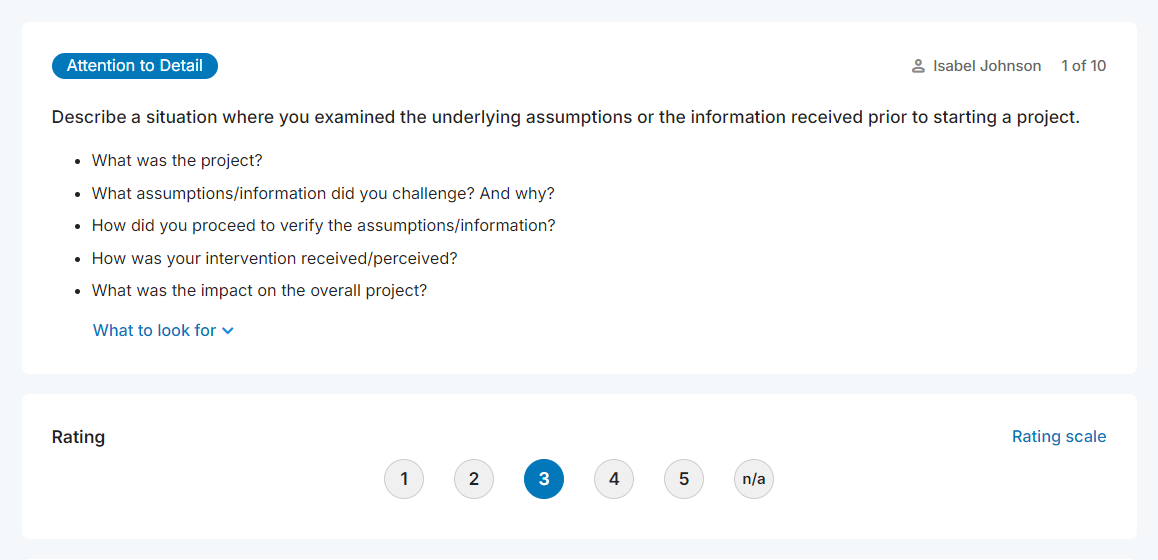
You’ll see your name in the top right corner when a question is assigned to you.
-
Read the question and the follow-ups.
-
Click What to look for to review the expected behaviours.
-
Click Rating scale to review the levels and understand what each rating signifies.
-
Click the All questions button
Step 3. Rate the candidate
-
Open the scorecard.
-
As you ask questions, select a rating or n/a.
-
Add notes in the textbox at the bottom of each question.
-
Add general notes at the end of the interview.
-
On the final page of the interview, provide your overall feedback.
-
Do you recommend moving forward with this candidate?
-
Is this candidate a good fit for the role?
-
-
Add comments to support your overall feedback.
Step 4. Submit the scorecard
-
Open the scorecard.
-
Click All questions on the bottom left of the page.
-
Review your answers and comments.
-
Click I’m done on the top right of the page.
-
Select Submit ratings now in the drop-down.
-
Click Go to home page. Depending on the settings, you might also have the option to view the ratings of other interviewers.
Your scorecard can’t be resubmitted.